

Cubbycraft
- Plays:
- 7
- Published:
- October 6, 2026
Share this game
Controls
- Use the mouse
- Use the keyboard
- W A S D to move
- Space to jump or act
- Tap the screen
- Gamepad supported
About the game
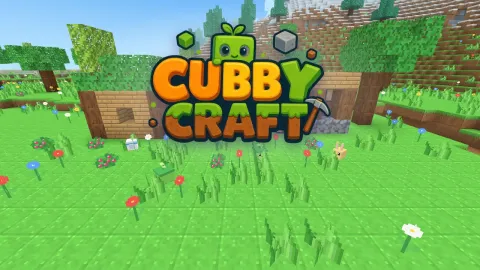
Cubbycraft is a free 3D block building game: a cosy island made of cubes that you explore, dig and build in, seen through your own eyes. Every island is generated from a seed, with a flowery meadow, a mossy forest, a cactus desert, snowy mountains, lakes, beaches and caves full of coal, copper, gold and glowing Starstone. Break blocks to collect them, craft tools at the Tinker Table, melt glass and bricks in the Kiln and build anything you imagine from more than sixty kinds of blocks: wood, stone bricks, glass, lanterns, nine colours and more.
Quest mode gives you something to do: 24 quests in three chapters, from your first wooden pickaxe to the Lookout Tower and the hidden Glimmer Grotto, with stars and rewards. Creative mode gives you every block, flying and building plans that can build themselves. Friendly creatures hop around the island: pet the Mosslings, feed them berries and look for the shy Pebblins in dark caves. The day turns into a starry night with fireflies, torches and lanterns light your home, and your worlds are saved in your browser. Plays with mouse and keyboard, touch or a gamepad.
How to play
- Move with W A S D and look around with the mouse; click on the game to capture the pointer, press Esc to free it and pause.
- Hold the left mouse button to break a block, right-click to place one (or to pet a creature). The wheel or the keys 1–9 pick an item from the quick bar.
- Space jumps (press it twice quickly to fly in Creative), Shift goes down, Ctrl runs, E opens the bag and crafting, Q the quest book.
- On a phone: walk with your left thumb, drag anywhere else to look, use the buttons to break, place and jump.
- Follow the quests, craft better tools, place building plans and fill in their see-through blocks. Your world is saved by itself.
Tips and tricks
- Start with wood: a few logs become planks, sticks and the Tinker Table that unlocks tools. Stand next to the table to use it.
- The right tool makes digging fast: pickaxe for stone and ores, axe for wood, shovel for earth, sand and snow. Ores need a good enough pickaxe to drop anything.
- Coal is the black-dotted stone near cave entrances. Torches (stick + coal) light your way and keep caves bright.
- A placed plan shows see-through blocks: aim at one and place the right block. The counter on the tracker tells you how much is left.
- Lost? Look for the stone gate with two lanterns: it leads down to the Glimmer Grotto and its Starstone.
- Hold berries in your hand and the creatures will follow you. A Pebblin pretends to be a rock in dark caves; pet it for a present.
- Leaves drop saplings now and then. Plant them on turf and a new tree grows after a minute.
- In Creative, double-tap Space (or the Fly button) to fly, and use "Build it for me" on a plan when you just want to decorate.
Features
- A whole island generated from a seed: meadow, forest, desert and snow biomes, lakes, beaches, caves and ores
- First-person digging and building with more than sixty block types, a hotbar and a 36-slot bag
- Crafting with clear recipes: planks, tools in four tiers, glass, bricks, lanterns, colour blocks and decorations
- Quest mode with 24 quests in three chapters, stars and rewards, plus a guided first run
- Creative mode with every block, flying and five building plans that can build themselves
- Four friendly creatures that hop, sleep at night and follow you for berries
- A full day and night cycle with sunsets, stars, fireflies and real light from torches and lanterns
- Three world slots saved in the browser, each with its own seed; mouse, touch and gamepad controls
Frequently asked questions
Is Cubbycraft free?
Yes. It runs in your browser, needs no download and no account, and there is nothing to buy.
Does my world stay when I close the game?
Yes. Up to three worlds are saved in your browser on this device. Clearing the browser data removes them.
Can I play on my phone?
Yes. Touch controls appear by themselves: the left thumb walks, dragging looks around, and there are buttons for breaking, placing and jumping.
What is the difference between Quest and Creative?
Quest mode starts you with empty hands: gather, craft and complete 24 quests for stars. Creative mode gives you every block at once and lets you fly.
Are there monsters?
No. The creatures of Cubbycraft are friendly, nothing attacks you and there is no health bar. The game is made for all ages.
Can two people play the same world?
Only one at a time, on the same device. There is no online play; every creature is computer-driven.
Comments
No comments yet. Be the first!